Best Lone Worker Safety App in 2026 for High-Risk Businesses
Table of Contents
- Why High-Risk Businesses Need a Dedicated Lone Worker Safety App
- What to Look for in a Lone Worker Safety App in 2026
- MyLoneWorkers: The Lone Worker Safety App Built for the Field
- Key Safety Features of the MyLoneWorkers Lone Worker Safety App
- Operational Features That Make MyLoneWorkers More Than a Lone Working App
- Why MyLoneWorkers Stands Out Among Lone Worker Solutions Apps
- Getting Started with the MyLoneWorkers Lone Worker Safety App
- Conclusion: Choose the Right Lone Worker Safety App in 2026
Every year, thousands of workers are injured — or worse — while working in isolation. Whether on a construction site, a remote utility facility, a night-shift security patrol, or a lone field service call, employees who work alone face risks that go undetected far too easily. For businesses in these environments, investing in the right lone worker safety app is no longer a choice — it is a duty of care, a compliance requirement, and in many cases, a matter of life or death.
In 2026, demand for reliable lone worker solutions apps has never been higher. But with an increasingly crowded market, identifying which lone working app genuinely protects your people — rather than just checking a box — requires a closer look. This guide walks you through what to demand from a lone worker safety app, how to evaluate the best options for high-risk industries, and why MyLoneWorkers has established itself as the platform of choice for businesses that take worker safety seriously.
Why High-Risk Businesses Need a Dedicated Lone Worker Safety App
Industries such as oil and gas, utilities, construction, healthcare, security, and logistics share a defining challenge: employees regularly work alone, in locations that are hard to monitor and even harder to reach quickly in an emergency.
A generic scheduling tool or a simple check-in spreadsheet is not a lone worker safety app — it is a false sense of security. The hazards that come with solitary work are specific and serious:
 Sudden medical emergencies: falls, cardiac events, loss of consciousness
- Exposure to hazardous materials or confined space atmospheres
- Security threats in isolated or high-crime environments
- Equipment failures with no colleague nearby to assist
Regulatory frameworks across the world — from the UK's Health and Safety at Work Act to EU lone worker directives and OSHA guidelines in the US — place a clear legal obligation on employers to assess and control the risks faced by lone workers. A purpose-built lone working app is the most practical and scalable way to meet that obligation while keeping daily operations running efficiently.
Beyond compliance, the right lone worker safety app actively reduces incident response times, improves worker confidence, and gives management real-time visibility into a dispersed workforce — regardless of where in the world they are deployed.
What to Look for in a Lone Worker Safety App in 2026
Not every working alone app delivers the protection it promises. When evaluating a lone worker safety app for a high-risk environment, these are the capabilities that separate serious platforms from superficial ones:
- Automated man-down detection. If a worker is incapacitated, they cannot press a button. A credible lone worker safety app must detect emergencies passively — through motion sensors or wearable devices — and trigger alerts without any action from the worker.
- SOS and panic alerting. Workers must be able to send an immediate distress signal from their phone and, critically, from a separate physical device when their phone is not accessible.
- Welfare check-ins with automatic escalation. Scheduled safety check-ins, with automatic alerts if a worker misses a window, ensure that no missed contact goes unnoticed.
- Real-time location tracking. Any reliable remote worker app should combine GPS, Wi-Fi, and GSM to provide accurate location data indoors and outdoors, in remote areas and urban environments alike.
- Geofencing. Virtual boundaries around job sites or restricted zones give managers an additional layer of passive situational awareness.
- Cloud-based infrastructure. A cloud-based lone worker safety app requires no expensive on-premise hardware, deploys quickly, and scales easily as headcount grows.
- Intuitive interface. Under pressure, a complicated working alone app becomes a liability. The best platforms are simple enough to use without training, even in high-stress situations.
MyLoneWorkers: The Lone Worker Safety App Built for the Field
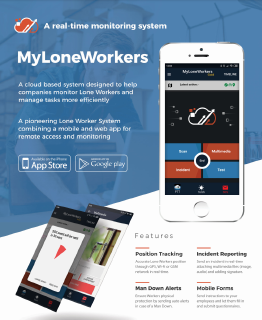
MyLoneWorkers is a comprehensive cloud-based lone worker safety app designed specifically for field operations and remote blue-collar workforces. It combines a real-time web management dashboard with native Android and iOS mobile applications, delivering a complete system for monitoring, protecting, and managing employees who work alone.
Unlike general workforce tools that bolt on safety features as an afterthought, MyLoneWorkers was architected from day one as a lone working app with the specific hazards of high-risk industries in mind. The result is a platform that provides both the safety depth and the operational breadth that demanding industries require.
Key Safety Features of the MyLoneWorkers Lone Worker Safety App
Man Down Alert
The Man Down feature is the cornerstone of any serious lone worker safety app — and MyLoneWorkers delivers it with hardware-level reliability. A sensor clip worn on the worker's uniform continuously monitors for falls, collapses, or sudden incapacitation. When triggered, a Man Down notification is instantly dispatched to the Monitoring Center, prompting an immediate response — without the worker needing to do anything at all.
This passive, always-on protection is what distinguishes a true lone worker safety app from a basic check-in tool. In scenarios where a worker suffers a sudden medical event or is rendered unconscious, Man Down detection can be the difference between a swift rescue and a tragedy.
SOS and Test Alert
When a worker recognizes a developing threat and can reach their device, pressing the SOS button in this working alone app sends an immediate alarm to the Monitoring Center with precise GPS coordinates. Simultaneously, the system sends SMS notifications to up to three designated contacts — ensuring the right people are alerted through multiple channels at once.
The Test Alert function lets workers verify their setup before a shift begins — confirming that connectivity, location data, and patrol configurations are all working correctly. It is a simple feature that builds real confidence in the lone worker safety app before workers head into the field.
Welfare Check
The Welfare Check feature adds a structured, time-based layer of safety to this lone working app. Managers define check-in intervals appropriate to the risk level of each assignment. If a worker fails to complete their welfare check within the set window, the system automatically generates an alert and notifies managers via both the web application and email. No missed check-in is ever silently overlooked.
This is particularly valuable for businesses deploying workers on overnight or extended shifts, where a delayed response to an incident can have severe consequences.
External BLE Panic Button
Some working environments make smartphone access impractical — cramped utility spaces, heavy protective gloves, fast-moving outdoor patrols. MyLoneWorkers addresses this with a Bluetooth Low Energy (BLE) external panic button. Workers press the physical button they carry, and a real-time SOS alert is dispatched immediately to the Monitoring Center.
This external device transforms MyLoneWorkers into a lone worker safety app that works even when the smartphone cannot — an important distinction for truly high-risk deployments.
Geofence Alerts
Managers can define virtual geographic boundaries around job sites, hazardous zones, or permitted working areas. The remote worker app triggers an alert whenever a worker enters or exits a defined geofence — providing a continuous, passive layer of location awareness that complements the active safety features.
SafePass
For businesses that extend protection to clients or VIPs — such as executive protection services or high-profile security operations — the SafePass feature provides designated individuals with access to a dedicated mobile application, giving them the same real-time protection as the core lone worker safety app workforce.
Test MyLoneWorkers for Free
Discover how MyLoneWorkers protects lone and field workers with man down alarms, real-time monitoring, and automated safety alerts. No installation or commitment required.
Operational Features That Make MyLoneWorkers More Than a Lone Working App
Man Down Alert
A great lone worker safety app should not operate in isolation from the rest of the business. MyLoneWorkers pairs its safety toolkit with a set of operational features that directly improve day-to-day efficiency.
Real-Time Checkpoint Scanning
Using NFC tags, Beacons, QR codes, and virtual checkpoints placed at specific locations, workers log their presence and activity in real time via the working alone app. Each scan sends timestamp and GPS data to the web dashboard through a secure cloud server. Workers can enrich each scan with photos, voice notes, written notes, and signatures — creating a detailed, verifiable audit trail for compliance, quality assurance, and client reporting purposes.
Asset Tracking
The Asset Tracking module allows managers to register and monitor physical assets — keys, equipment, and devices — tracking who holds each item, when it was issued, and when it is due to be returned. This closes an accountability gap that many field operations struggle to manage without a dedicated lone worker solutions app.
Time & Attendance
The Time & Attendance module provides real-time visibility into employee check-in and check-out times, shift durations, and breaks — fully integrated within the same remote worker app platform used for safety monitoring. This eliminates the need for separate HR tools and ensures accurate, tamper-resistant attendance records.
This hardware integration is what distinguishes a truly comprehensive work alone safety app from one that only works in ideal conditions. Real-world lone working is rarely ideal, and MyLoneWorkers is built for real-world conditions.
AI Reports
In 2026, AI-powered reporting is a standard expectation for any serious lone worker safety app, and MyLoneWorkers delivers. Managers can ask natural-language questions directly inside the platform — such as "Show all incidents in the last 7 days" or "Which worker triggered SOS alerts today?" — and receive instant, structured reports in response. No complex filtering, no dashboard navigation. Just answers, immediately.
Why MyLoneWorkers Stands Out Among Lone Worker Solutions Apps
There are a number of lone worker solutions apps on the market in 2026. Here is why MyLoneWorkers consistently stands out for high-risk businesses:
- Zero installation costs. The cloud-based infrastructure means rapid deployment with no on-premise hardware requirements and no IT complexity.
- Multi-layered alerting. From passive Man Down detection to manual SOS, physical BLE panic buttons, welfare check escalation, and geofence triggers — no single point of failure leaves a worker unprotected.
- Global scalability. The web application manages locations and buildings worldwide, making it suitable for multinational operations and single-site businesses alike.
- Industry versatility. Whether the workforce is in security, utilities, healthcare, logistics, construction, or field services, MyLoneWorkers adapts to each sector's specific risk profile.
- Compliance-ready audit trail. Real-time monitoring logs, incident records, and automated alerting documentation give businesses the evidence they need to demonstrate duty-of-care compliance to regulators and insurers.
- Continuous improvement. Regular platform updates, AI-driven features, and an expanding ecosystem of hardware integrations ensure that the lone worker safety app evolves alongside the industries it serves
Getting Started with the MyLoneWorkers Lone Worker Safety App
Deploying MyLoneWorkers is fast and straightforward. The lone working app runs on standard Android and iOS smartphones, with optional sensor clips and BLE panic buttons for enhanced hardware protection. The web dashboard is accessible from any browser, providing a clean and intuitive interface for real-time monitoring, scheduling, incident management, and compliance reporting.
For businesses adopting a dedicated lone worker safety app for the first time — or replacing an outdated system — MyLoneWorkers offers a scalable starting point that grows with your team, your risk profile, and your operational complexity.
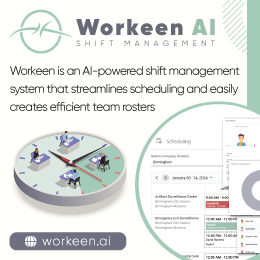
Optimize Your Scheduling with Workeen AI
Transform your workforce management with Workeen AI, the AI-powered shift management system designed to simplify scheduling for industries with round-the-clock operations. Effortlessly create efficient rosters, manage unexpected absences, and ensure fair work distribution with predictive insights and real-time updates. Boost productivity and compliance while keeping your team informed through instant communication tools.
Conclusion: Choose the Right Lone Worker Safety App in 2026
In high-risk industries, inadequate lone worker protection carries consequences that no business can afford — human, legal, and reputational. The right lone worker safety app does not just satisfy a compliance requirement. It actively keeps people safe, gives managers the visibility they need, and ensures that when something goes wrong, the response is immediate and coordinated.
MyLoneWorkers delivers on every dimension that matters: real-time monitoring, automated and passive alerting, hardware integration, operational efficiency features, and AI-powered reporting. For any business serious about protecting employees who work alone, it is the lone working app that belongs at the top of the 2026 shortlist.
Ready to protect your lone workers? Visit myloneworkers.com to learn more and test it for free today.
About MyLoneWorkers
MyLoneWorkers innovative system reduces the risks and guarantees that every lone worker returns home safely after carrying out their tasks at work which is one of the most basic responsibilities for an employer. It is a real time lone worker monitoring system which skyrockets the efficiency of lone workers’ safety and the completion of their tasks offering them the ability to increase their productivity via technology.