Why Every Business Needs a Workplace Safety App for Employees Working Alone
Table of Contents
- The Growing Risk of Working Alone
- Legal and Compliance Obligations for Businesses with Lone Workers
- What a Workplace Safety App Must Deliver
- Introducing MyLoneWorkers: A Workplace Safety App Designed for the Field
- Core Features of the MyLoneWorkers Workplace Safety App
- Operational Features That Make MyLoneWorkers More Than a Work Alone App
- Why MyLoneWorkers Is the Right Workplace Safety App for Your Business
- Conclusion: A Workplace Safety App Is Not a Luxury — It Is a Necessity
Workplace safety has always been a priority for responsible businesses. But for organizations with employees who regularly work alone — in the field, on remote sites, during overnight shifts, or in isolated facilities — standard safety protocols are simply not enough. When no colleague is nearby to witness an incident or call for help, the stakes are exponentially higher. That is why a dedicated workplace safety app has become an essential tool for any business that takes its duty of care seriously.
In 2026, the risks associated with lone working are well-documented, and so are the legal obligations employers carry. A robust work safety app does not just protect workers from harm — it protects businesses from liability, ensures regulatory compliance, and provides management with the real-time visibility needed to respond fast when things go wrong. This article explains why every business with lone workers needs a workplace safety app, what to look for in the best platforms, and how MyLoneWorkers delivers comprehensive protection for employees who work alone.
The Growing Risk of Working Alone
Lone working is far more common than most people realize. Security guards, field engineers, healthcare workers, utility technicians, delivery drivers, cleaning staff, and construction workers all regularly work alone — often in conditions that carry significant risk. According to industry data, lone workers account for a substantial proportion of all workplace fatalities and serious injuries each year.
The core problem is simple: when an employee works alone, there is no one else present to recognize that something has gone wrong, call for emergency services, or provide immediate first aid. A fall that would be minor in a team environment can become fatal if the worker cannot summon help. A medical episode that could be survived with quick intervention becomes life-threatening when the nearest colleague is miles away.
This is precisely the gap that a workplace safety app fills. By maintaining a continuous digital connection between the worker and a monitoring center — regardless of location — a work alone safety app ensures that no incident goes undetected and no worker is ever truly without support.
Legal and Compliance Obligations for Businesses with Lone Workers
Beyond the moral imperative, businesses have clear legal responsibilities when it comes to employees who work alone. In the UK, the Health and Safety at Work Act 1974 and the Management of Health and Safety at Work Regulations 1999 require employers to assess the specific risks of lone working and put appropriate controls in place. EU member states have their own directives with similar intent. In the United States, OSHA standards place comparable obligations on employers across high-risk sectors.
A workplace safety app is one of the most practical and auditable ways to demonstrate that a business is meeting these obligations. It creates a timestamped, verifiable record of check-ins, welfare assessments, incident alerts, and management responses — exactly the kind of documentation that regulators and insurers want to see.
Failing to provide adequate protection for employees who work alone exposes businesses to enforcement action, substantial fines, civil liability claims, and — most damaging of all — preventable harm to their workforce. Investing in a work safety app is not a cost; it is risk management at its most direct.
What a Workplace Safety App Must Deliver
Not every work alone app on the market provides the depth of protection that high-risk environments demand. When evaluating a workplace safety app for a business with lone workers, these are the non-negotiable capabilities:
 Passive emergency detection. The best work alone safety apps do not rely solely on the worker being able to press a button. Automated man-down detection — triggered by sensors rather than user action — is essential for scenarios where a worker is incapacitated.
- SOS alerting via multiple channels. A work safety app should allow workers to send an immediate distress signal from their smartphone and, for environments where phone access is impractical, from a separate wearable or physical panic device.
- Scheduled welfare checks with escalation. Timed check-ins with automatic manager alerts for missed responses ensure that the absence of a signal is treated as a potential emergency, not simply ignored.
- Real-time GPS location tracking. Any credible workplace safety app must provide accurate, real-time location data so that emergency responders know exactly where to go. GPS combined with Wi-Fi and GSM triangulation ensures coverage across indoor and outdoor environments.
- Geofencing. Virtual boundaries around permitted or hazardous zones provide an additional layer of passive monitoring, alerting managers whenever a lone worker enters or exits a defined area.
- Cloud-based architecture. A cloud-based work alone app requires no on-premise hardware, deploys rapidly, and scales without infrastructure investment — critical for businesses of all sizes.
- Audit trail and reporting. Comprehensive, automatically generated records of all safety activity support compliance documentation and provide the evidence base for continuous improvement.
Introducing MyLoneWorkers: A Workplace Safety App Designed for the Field
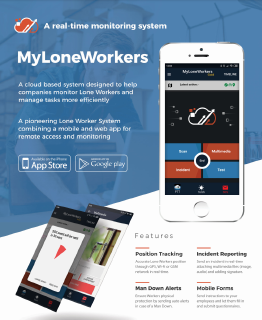
MyLoneWorkers is a cloud-based workplace safety app built specifically for businesses with field operations and remote blue-collar workforces. Combining a powerful web management dashboard with native Android and iOS mobile applications, it delivers end-to-end protection and operational oversight for employees who work alone — anywhere in the world.
Every feature in MyLoneWorkers exists to solve a real problem faced by workers and managers in high-risk environments. It is a work safety app with no unnecessary complexity and no critical gaps — just reliable, field-proven protection.
Test MyLoneWorkers for Free
Discover how MyLoneWorkers protects lone and field workers with man down alarms, real-time monitoring, and automated safety alerts. No installation or commitment required.
Core Features of the MyLoneWorkers Workplace Safety App
Man Down Alert
The Man Down feature is the most important capability any work alone safety app can offer. When a lone worker collapses, falls, or slips — and cannot reach their smartphone — a sensor clip worn on their uniform detects the incident and automatically sends a Man Down notification to the Monitoring Center. No action is required from the worker. Help is on its way before they have a chance to ask for it.
This passive, hardware-driven protection transforms MyLoneWorkers from a standard work alone app into a genuine lifesaving system. For businesses operating in construction, utilities, security, or any sector where sudden incapacitation is a realistic risk, Man Down detection is not optional — it is essential.
SOS Alert and Test Alert
When a worker identifies a threat and can reach their device, the SOS button in this workplace safety app sends an immediate alarm to the Monitoring Center along with precise GPS coordinates. Up to three additional contacts receive simultaneous SMS notifications — ensuring a rapid, multi-channel response regardless of who is available to act.
The Test Alert feature allows workers to confirm that their device, connectivity, and patrol route are functioning correctly before beginning a shift. It is a small but important feature that builds confidence in the work safety app and reduces the risk of technical failures at the worst possible moment.
Welfare Check
For employees who work alone across extended or overnight shifts, the Welfare Check feature provides structured, time-based reassurance. Managers set check-in intervals appropriate to the risk level of each assignment. If a worker misses a check-in, the system immediately generates an alert and notifies managers via the web application and email. The absence of a response is treated as an emergency signal — never as silence to be ignored.
This feature is particularly valuable for businesses deploying workers in healthcare, hospitality, or facility management roles where working alone is routine but the risks are very real.
External BLE Panic Button
Some working environments make it genuinely impractical for a lone worker to access their smartphone quickly — heavy protective gloves, confined utility spaces, fast-paced security patrols. MyLoneWorkers solves this with an external Bluetooth Low Energy (BLE) panic button. Workers press the physical device they carry, and a real-time SOS is immediately dispatched to the Monitoring Center.
This hardware integration is what distinguishes a truly comprehensive work alone safety app from one that only works in ideal conditions. Real-world lone working is rarely ideal, and MyLoneWorkers is built for real-world conditions.
Geofence Alerts
Managers can define virtual geographic boundaries — around job sites, restricted areas, or permitted working zones. The workplace safety app triggers an alert whenever a lone worker enters or exits a defined geofence. This continuous, passive monitoring layer adds situational awareness without requiring any action from the worker, making it one of the most operationally low-friction features of the platform.
SafePass
For businesses with VIP protection obligations or high-profile client responsibilities — executive security firms, corporate risk teams, or event management companies — the SafePass feature extends the work safety app protection model to clients and designated individuals through a dedicated mobile application. The same platform that keeps field workers safe can also safeguard the people they are assigned to protect.
Operational Features That Make MyLoneWorkers More Than a Work Alone App
A great workplace safety app should add operational value as well as safety protection. MyLoneWorkers integrates a full suite of field management tools that work alongside its safety capabilities.
Real-Time Checkpoint Scanning
Using NFC tags, Beacons, QR codes, and virtual checkpoints deployed at specific locations, workers log their presence and activities in real time via the work alone app. Each scan transmits timestamp and GPS data to the web dashboard through a secure cloud server. Workers can attach photos, voice notes, written notes, and signatures to any scan — building a rich, auditable record of field activity for compliance, quality assurance, and client reporting.
Asset Tracking
The Asset Tracking module lets managers register and monitor physical assets — keys, equipment, devices — tracking custody, issue dates, and expected return times. For businesses where asset accountability matters as much as personal safety, this feature closes an important operational gap without requiring a separate system.
Time & Attendance
Accurate, real-time tracking of employee working hours, breaks, and check-in and check-out times is built directly into the workplace safety app. The Time & Attendance module eliminates the need for a separate HR tool, ensures tamper-resistant attendance records, and integrates seamlessly with shift management for mobile and dispersed teams.
AI Reports
The AI Reports feature brings intelligent, natural-language reporting to lone worker management. Managers can ask questions directly inside the platform — "Show all incidents in the last 7 days", "Which workers missed welfare checks this week?", "Where were SOS alerts triggered today?" — and receive instant, structured answers. No complex filtering, no navigating multiple dashboards. For businesses managing large or dispersed workforces, AI-powered reporting turns data into decisions in seconds.
Why MyLoneWorkers Is the Right Workplace Safety App for Your Business
There are several work alone apps available in 2026, but MyLoneWorkers stands apart in ways that matter most to high-risk businesses:
- No hardware installation costs. Cloud-based deployment means the workplace safety app is operational within hours, not weeks.
- Redundant safety layers. Man Down detection, manual SOS, physical BLE panic button, welfare checks, and geofencing work together so that no single failure point leaves a worker unprotected.
- Global coverage. Manage workers and locations worldwide from a single web dashboard — ideal for multinational operations and businesses with distributed teams.
- Built for real work environments. From construction sites to hospital corridors to remote utility infrastructure, this work alone safety app is designed for the conditions where lone workers actually operate.
- Compliance documentation built in. Every alert, response, check-in, and incident is automatically logged, giving businesses a complete compliance record without any additional administrative effort.
Optimize Your Scheduling with Workeen AI
Transform your workforce management with Workeen AI, the AI-powered shift management system designed to simplify scheduling for industries with round-the-clock operations. Effortlessly create efficient rosters, manage unexpected absences, and ensure fair work distribution with predictive insights and real-time updates. Boost productivity and compliance while keeping your team informed through instant communication tools.
Conclusion: A Workplace Safety App Is Not a Luxury — It Is a Necessity
The question in 2026 is not whether your business needs a workplace safety app for employees who work alone. The question is whether the one you choose delivers the protection your workers actually need — and the visibility your management requires.
MyLoneWorkers answers both questions decisively. It is a work safety app built for the field, designed for high-risk conditions, and proven across industries where lone working is a daily reality. From Man Down detection and SOS alerting to welfare checks, AI reports, and full operational management, it gives businesses everything they need to protect their people and meet their legal obligations.
Every business with lone workers needs a workplace safety app. Make sure yours is one that genuinely works.
Explore MyLoneWorkers and book a demo today.
About MyLoneWorkers
MyLoneWorkers innovative system reduces the risks and guarantees that every lone worker returns home safely after carrying out their tasks at work which is one of the most basic responsibilities for an employer. It is a real time lone worker monitoring system which skyrockets the efficiency of lone workers’ safety and the completion of their tasks offering them the ability to increase their productivity via technology.