Best Lone Worker App in 2025: How to Choose the Right Solution for iPhone and Android Teams
Table of Contents
- Why Choosing the Best Lone Worker App Matters in 2025
- Cross-Platform Support: Why You Need a Lone Worker App for iPhone and Android
- What Is MyLoneWorkers? A Complete Workforce Safety Management System
- How MyLoneWorkers Works
- Why MyLoneWorkers Is the Best Lone Worker App for 2025
- How to Choose the Best Lone Worker App in 2025
- Why MyLoneWorkers Is the Right Choice for iPhone and Android Teams
- Final Thoughts: The Best Lone Worker App for Modern Teams
Keeping lone workers protected has become a top priority for organizations operating in field services, facility management, hospitality, and other high-risk industries. As technology advances and workplace safety standards evolve, companies are increasingly searching for the best lone worker app—one that functions seamlessly across devices, improves emergency response times, and empowers teams with real-time monitoring and reporting.
In 2025, choosing a reliable and scalable lone worker solution means selecting a platform that supports both iPhone and Android devices. Whether your workforce uses company-issued smartphones or a bring-your-own-device (BYOD) model, compatibility is essential.
This guide explains what to look for when selecting the best lone worker app for your organization—along with why MyLoneWorkers stands out as a powerful, cloud-based solution that keeps field teams protected, connected, and compliant.
Why Choosing the Best Lone Worker App Matters in 2025
The modern lone worker faces more risks than ever: isolated locations, unpredictable hazards, demanding schedules, and exposure to emergencies without direct supervision. A dependable mobile safety system is no longer optional—it’s a critical part of operational safety compliance.
Businesses are looking for apps that provide:
 Instant emergency alerts
- Real-time location tracking
- Automatic man-down detection
- Seamless iPhone and Android functionality
- Cloud-based reporting tools
- Ease of deployment across teams and regions
A strong lone worker app not only prevents accidents and improves response times—it enhances operational efficiency, lowers compliance risks, and improves worker confidence.
Cross-Platform Support: Why You Need a Lone Worker App for iPhone and Android
Teams rarely operate using a single type of device. Field workers might use rugged Android phones, while supervisors may rely on iPhones. Contractors may join with their own devices. If your safety system doesn’t support both ecosystems, your workforce becomes fragmented.
That’s why choosing a lone worker app for iPhone and a lone worker app for Android is essential.
Key Benefits of Cross-Platform Compatibility
- Unified safety standards across the organization
- Simplified training for employees
- Reduced hardware limitations
- Faster implementation with no need to standardize devices
- Lower total cost of ownership
MyLoneWorkers offers full functionality on both iOS and Android, ensuring consistent safety protocols across all personnel.
What Is MyLoneWorkers? A Complete Workforce Safety Management System
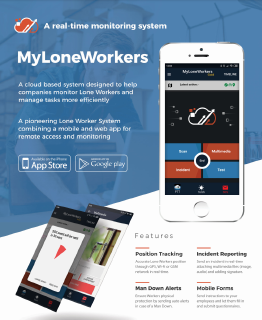
MyLoneWorkers is a comprehensive cloud-based workforce management and safety solution designed specifically for remote and blue-collar workers. It consists of a powerful web application and fully featured mobile applications for both Android and iOS, ensuring maximum protection and operational visibility for lone workers.
Core Purpose:
- Monitor lone workers in real-time
- Prevent accidents and hazards
- Improve emergency response
- Streamline field operations
- Support compliance across industries
With MyLoneWorkers, companies can safeguard their workforce with advanced monitoring tools, automated alerts, and rich data insights—all centralized in a single, intuitive platform.
How MyLoneWorkers Works
MyLoneWorkers operates as an advanced online monitoring system using NFC, Beacon, QR-code, and Virtual Checkpoint technology to track worker activity and location.
Step-by-Step Operation:
- 1. Workers scan checkpoints placed at specific locations.
- 2. Each scan transmits data to the cloud with GPS, Wi-Fi, and GSM coordinates.
- 3. Incidents and updates appear instantly in the web application.
- 4. Managers receive real-time notifications and can supervise multiple sites worldwide.
- 5. Workers can attach photos, voice messages, notes, and signatures to tasks.
- 6. In emergencies, workers press the SOS button to send instant alerts with precise location details.
This smart automation ensures transparency, traceability, and safety—no matter where workers are located.
Why MyLoneWorkers Is the Best Lone Worker App for 2025
MyLoneWorkers combines powerful field safety tools with real-time monitoring, making it an ideal choice for organizations seeking the best lone worker app that works equally well on iPhone and Android.
Here’s what sets it apart:
1. Comprehensive Safety Features Built for Real Emergencies
Field workers face unpredictable hazards every day. MyLoneWorkers provides multiple layers of protection:
- Man Down Alerts: If a worker collapses, slips, or becomes immobilized, the system automatically sends a notification—without the worker needing to press anything.
- SOS / Test Alerts: A dedicated SOS button instantly alerts the monitoring center and can trigger SMS notifications to key personnel.
- External BLE Panic Button: Workers can send distress signals even if they cannot reach their phone.
- Welfare Check System: If a scheduled check-in is missed, supervisors are automatically notified.
- Geofence Alerts: Managers can set predefined zones and receive updates when checkpoints are scanned outside allowed areas.
These features make MyLoneWorkers one of the most advanced and reliable mobile safety solutions available today.
2. Full Compatibility: The Best Lone Worker App for iPhone and Android
Many safety apps fail to offer identical experiences on both major mobile operating systems.
MyLoneWorkers ensures:
- Equal functionality on iOS and Android
- Optimized performance for each device type
- Seamless updates and feature parity
- BYOD-friendly deployment
This makes MyLoneWorkers the ideal lone worker app for iPhone teams, lone worker app for Android teams, or mixed environments.
3. Cloud-Based Deployment with Zero Installation Costs
Organizations can launch MyLoneWorkers instantly—no extra hardware, no IT infrastructure, and no complex setup.
Benefits include:
- Faster onboarding
- Lower costs
- Remote access from anywhere
- Automatic software updates
Your safety system is always operational and always up to date.
4. Advanced Operational Tools for Smarter Management
MyLoneWorkers goes beyond basic safety monitoring. It includes intelligent features that support daily operations, audits, and compliance.
- Issue Management & Work Orders: Managers can track incidents from initial report to resolution. Work orders include deadlines, required tools, skills, and location data for efficient task assignment.
- Trail Workers (Route Tracking): MyLoneWorkers automatically maps a worker’s route, producing detailed static or animated paths for auditing, supervision, and compliance tracking.
- Custom Fields: Add unique data fields tailored to your organization’s needs. Perfect for inspections, notes, or industry-specific requirements.
5. AI Assistant for Instant Data Insights
The built-in AI Assistant transforms how managers interact with reports. Instead of navigating menus, they can simply ask:
- “Show all incidents from last week.”
- “Which worker triggered the most SOS alerts today?”
- “Give me a summary of emergency events this month.”
The AI then instantly generates accurate results, improving:
- Decision-making
- Response times
- Daily workflows
Saved Questions allow managers to access frequent queries with one click.
6. SafePass: Extending Protection Beyond Employees
Companies can offer VIPs and at-risk individuals their own dedicated mobile application for real-time monitoring. SafePass is ideal for:
- Executives
- Clients
- Visitors
- High-risk individuals requiring additional oversight
It strengthens the organization’s overall duty of care.
How to Choose the Best Lone Worker App in 2025
When selecting a safety solution for field teams, look for the following criteria:
1. Device Compatibility
Your app must operate flawlessly on:
- iPhones
- Android devices
- Rugged phones
- Tablets
MyLoneWorkers supports all major mobile environments and devices.
2. Real-Time Tracking
Instant visibility is essential for responding to emergencies quickly.
3. Automated Safety Tools
Man Down detection, SOS alerts, welfare checks, and geofencing are mandatory features for modern lone worker solutions.
4. Cloud-Based Infrastructure
Cloud technology ensures scalability, quick deployment, and remote management.
5. User-Friendly Mobile App
Workers must be able to use the app easily—even in stressful environments.
6. Reliable Reporting & Analytics
Compliance relies on accurate, real-time data. MyLoneWorkers provides robust reporting dashboards and AI-driven insights.
7. Expandability & Customization
A good lone worker app should grow with your organization. MyLoneWorkers offers modular features, add-on capabilities, and customizable fields.
Why MyLoneWorkers Is the Right Choice for iPhone and Android Teams
Whether your organization operates a small local team or a global workforce spread across multiple sites, MyLoneWorkers delivers the functionality, safety, and reliability you need.
Key Advantages:
- Works perfectly on both iPhone and Android
- Offers industry-leading safety tools
- Provides real-time global monitoring
- Uses cloud technology for fast deployment
- Delivers detailed reporting and AI-powered insights
- Scales easily as your organization grows
MyLoneWorkers isn’t just another mobile app—it’s a complete workforce management and lone worker safety ecosystem.
Final Thoughts: The Best Lone Worker App for Modern Teams
In 2025, the best lone worker app is one that combines safety, mobility, scalability, and cross-platform compatibility. MyLoneWorkers meets and exceeds these expectations with powerful features, robust emergency tools, seamless iPhone and Android functionality, and advanced AI-driven reporting.
If your organization is committed to protecting remote or field-based employees, MyLoneWorkers offers a comprehensive and future-proof approach to lone worker safety.
Start protecting your lone workers today. Book a demo with us today or contact our team to learn how a modern lone worker application can strengthen safety across your organisation.
About MyLoneWorkers
MyLoneWorkers innovative system reduces the risks and guarantees that every lone worker returns home safely after carrying out their tasks at work which is one of the most basic responsibilities for an employer. It is a real time lone worker monitoring system which skyrockets the efficiency of lone workers’ safety and the completion of their tasks offering them the ability to increase their productivity via technology.